





























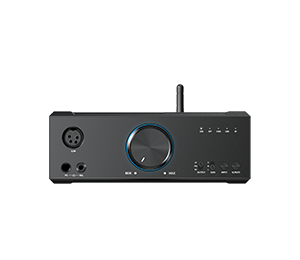













































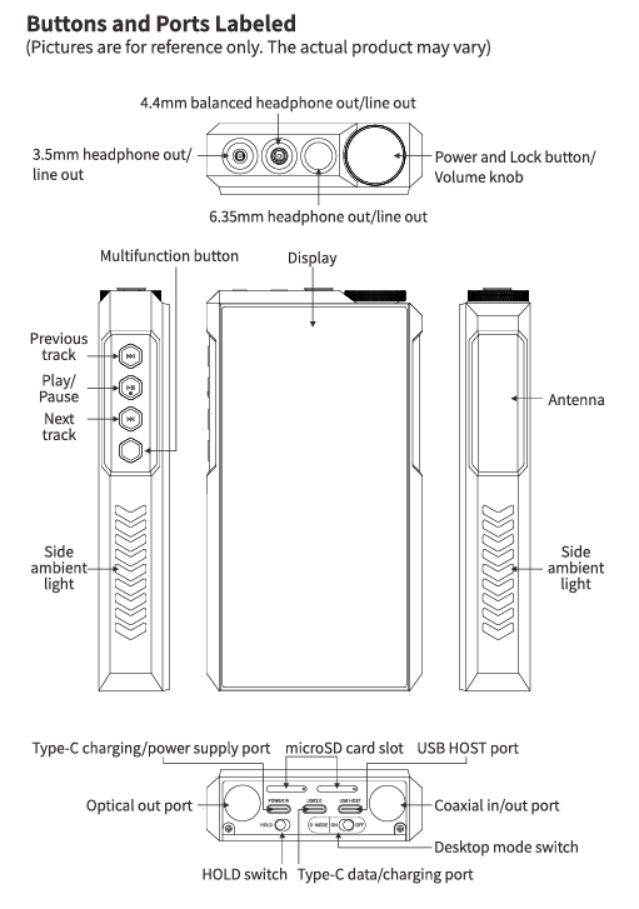
3. Buttons and ports instruction of M27
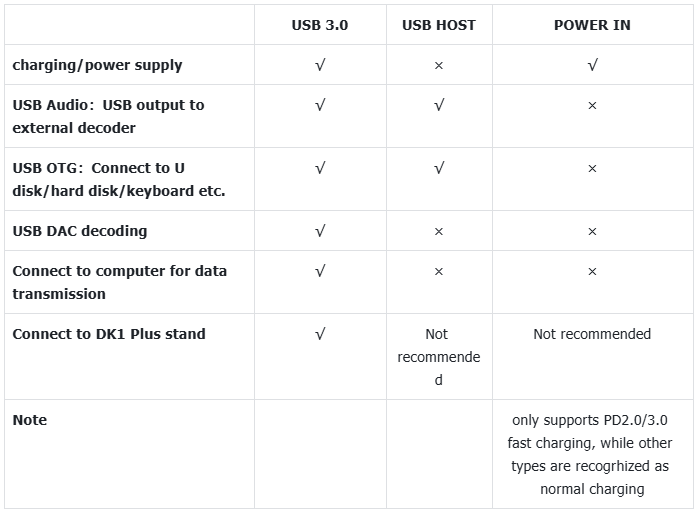
1.What are the differences between the three USB ports at the bottom of the M27?
2.M27 Output priority
USB output>Bluetooth>Coaxial=optical=3.5&4.4&6.35 analog output
The 3.5mm, 4.4mm, and 6.35mm output ports can output audio simultaneously. However, it is recommended to connect only one port at a time, as multiple connections may result in some power loss.
3.How to use the multifunction button?
①In Android/pure music mode: Add to Favorites (default option), Play next song randomly (randomly play the next song according to random play rules), Play/Pause, Delete currently playing song, Switch filter (cyclically), Switch equalizer (cyclically), Enter USB DAC Mode, Enter Bluetooth Receiving Mode, Lock screen/Wake up, Enter Cassette Mode, Open dropdown menu, No function
②In Bluetooth Receiving mode/USB DAC mode, the multifunction button is forcibly set to: No Function.
Note: This button only responds in Android mode/Pure Music mode, and some functions only apply to FIIO Music.
4.What TF card is recommended for M27?
The M27 supports two microSD cards simultaneously, with each card supporting up to 2TB theoretically. The read/write speed of both slots is nearly identical.
5.M27's antenna information and precautions
The upper left side of the M27 houses the physical control buttons, while the right side contains the antenna area. Please avoid covering the antenna area with metal objects, as this can interfere with wireless performance. Normal handheld operation does not affect signal reception.
