









































































8. Input and output instructions of DM15 R2R
DM15 Input Modes:
1.CD IN: CD mode, audio source from CD disc.
2.USB IN: USB decoding mode, audio source from devices such as mobile phones or computers.
DM13 Three Output Modes:
1.When the output mode switch is pushed to the top: PRE OUT (headphone output)

2.When the output mode switch is pushed to the middle: BLUE OUT (Bluetooth output).

3.When the output mode switch is pushed to the bottom: SPDIF OUT (coaxial output).

Note: After selecting any of the three working modes, the corresponding icon will appear in the lower-right corner of the display (headphone, Bluetooth, or coaxial cable symbols, respectively).
[Instructions on output in different input and output modes]
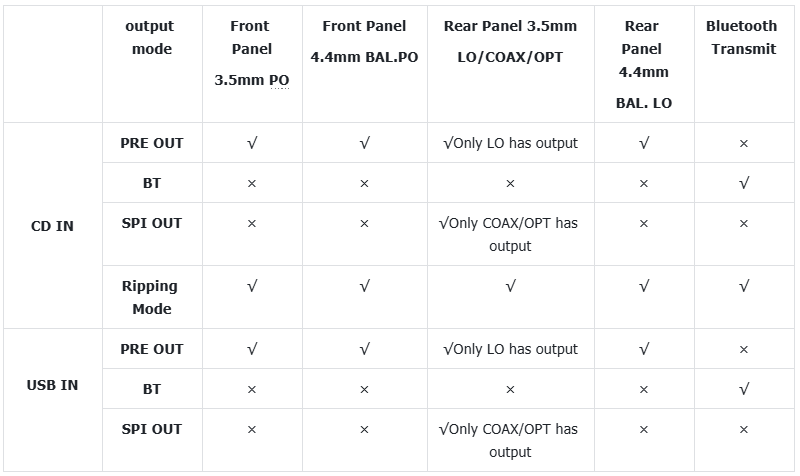
Front Panel 3.5mm PO / 4.4mm BAL.PO: Single-ended PO output, typically used for connecting headphones.
Rear Panel 4.4mm BAL.LO: Balanced LO output, typically used for connecting to speakers or amplifiers with balanced inputs.
LO/COAX/OPT: Coaxial output (COAX) / Optical output (OPT) / shared with the 3.5mm LO output port.
Note: When using PRE OUT mode and connecting headphones to an output port, it is recommended to use the front panel 3.5mm PO or the front panel 4.4mm BAL.PO.
