









































































14. How to Use the Bluetooth Transmission Function of the DM15 R2R?
[Pairing & Connection]
Note: When entering Bluetooth mode for the first time, the device will automatically search for available devices and enter the pairable device list.
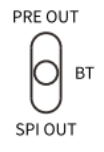
1.Turn on the DM15 R2R and switch the output selector to BT OUT.
2.Press and hold the volume knob (encoder) to enter the system menu, then rotate the knob to select Bluetooth pairing search.
3.After entering the Bluetooth pairing search, the list will display: "Search for Bluetooth devices" and "Paired devices".
4.Rotate the volume knob to "Search for Bluetooth devices" and briefly press the knob to enter.
5.Rotate the volume knob to select the name of the Bluetooth device you wish to connect to, then briefly press the knob to initiate pairing.
[Paired Devices]
List Capacity:
Only the 8 most recently connected devices are displayed. If more than 8 devices have been paired, the oldest device in the list will be automatically replaced.
When Bluetooth is not connected:
Upon entering this list, currently available paired devices are shown first. Rotate the volume knob to select the desired device, then briefly press the knob to enter its sub-menu. The menu will display three options: Connect / Delete / Return.
When Bluetooth is connected:
Upon entering this list, three options are displayed directly for the currently connected device: Disconnect / Delete / Return. Rotate and briefly press the volume knob to perform the desired operation.
Note: Bluetooth volume has 16 levels and supports volume synchronization.
Why Does the DM15 R2R Not Support aptX Lossless for Bluetooth Transmission?
So far, Qualcomm has not yet opened the aptX Lossless license for the QCC3095 chipset to all manufacturers. However, aptX Adaptive is sufficient to meet the needs of most users.
