








































































8. LEVEL 1 Bluetooth Instructions
1.How to connect via Bluetooth
When powered on for the first time, LEVEL 1 enters Bluetooth input mode by default. The RGB light will flash red and blue. Search for JadeAudio LEVEL 1 on your device and connect to it. After connection, the LEVEL 1 indicator light will stay on.
If LEVEL 1 is currently in another input mode after power-on and you want to connect via Bluetooth, please press the input selection button first to switch to Bluetooth mode, then connect.
2.Force pairing and clear pairing Force pairing: Press and hold the volume knob for 3 seconds to enter force pairing mode.
Clear pairing: Press and hold the volume knob for 10 seconds to clear the pairing record.
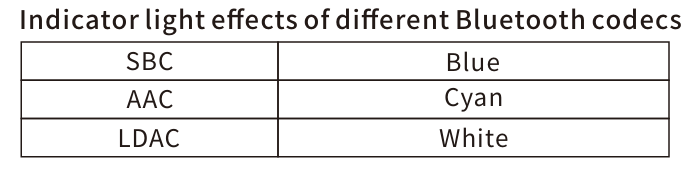
3.Bluetooth coding indicator lights
ꄘViews:0
